Tailscale Setup for Home Lab
Tailscale is a mesh VPN that lets you reach your home lab from anywhere — securely — without touching port forwarding or static IPs.
Setup is minimal: create an account, install the client on each machine, and the system builds a private network automatically. Every device gets its own IP address; you SSH or hit services as if everything is on the same LAN.
The free plan covers up to 100 devices, which is more than enough for most setups. It’s ideal if you want to reach your NAS or self-hosted services from outside without worrying about security — it’s WireGuard end-to-end the whole way.
When Home Lab Turns Into a Nightmare
Before I found Tailscale, remote access was a constant headache. Every time I wanted to hit the NAS or Pi-hole from outside, I had to remember a pile of IP/port combos: 192.168.1.50:8080 for Proxmox, 192.168.1.100:9000 for Portainer, and so on.
The bigger problem: ISPs hand out dynamic IPs, so the address I memorized last week might be wrong today. Port forwarding is also a security risk — you’re punching holes in your router and hoping nobody’s scanning you.
I kept thinking there had to be a better way than memorizing IP/port pairs and worrying about exposure every time you open a service to the internet.
Where Tailscale Sits in the VPN Landscape
Tailscale isn’t a traditional VPN. Instead of routing everything through a central server, it builds a mesh network where devices talk directly via WireGuard.
Compared to OpenVPN or IPSec — both of which require real configuration knowledge — Tailscale is install-and-login. Competitors in the mesh space include ZeroTier and Nebula, but Tailscale wins on user experience by a wide margin.
Tailscale fundamentally changes how you think about home lab networking. Port forwarding and dynamic DNS become irrelevant; it’s like having your own private internet.
vs. the Old Way
| Factor | Tailscale | Traditional Methods |
|---|---|---|
| Setup | Install app and login | Config router, port forward, dynamic DNS |
| Security | WireGuard + key rotation | Manual certificate management |
| Remote access | Connect directly | Memorize IP or domain |
| Management | Central web console | Edit config per machine |
| Cost | Free for 20 devices | Free (but costs time) |
The old OpenVPN/port-forwarding approach takes serious time to configure, requires solid networking knowledge, and breaks again whenever your public IP changes.
Tailscale makes a home lab genuinely shareable — hand a teammate access to a machine and they can reach your services immediately, no SSH keys distributed, no router rules touched.
Features That Actually Change Your Workflow
Magic DNS replaces cryptic IPs with human-readable names. Instead of remembering 100.64.1.25, you just type pi-server or nas-storage. Services become bookmarkable.
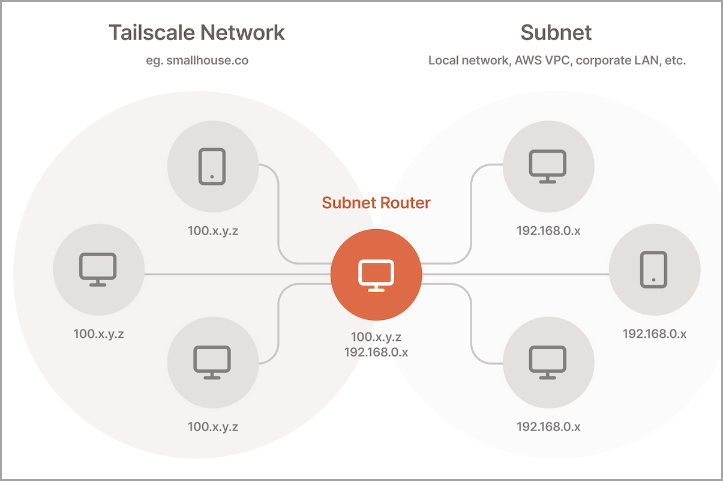
Subnet Router lets machines outside your Tailnet reach local devices that don’t have Tailscale installed — printers, IoT devices, legacy gear. Best feature in the toolkit, because you’re not forced to install an agent on everything.
Exit Node promotes any machine in your network to a VPN gateway. When you’re on the road, all traffic routes through your home network — useful for bypassing geo-locks or reaching local-only services.
ACLs give you fine-grained access control: who can reach what. Keeps teammates from accidentally hitting production infrastructure.
vs. Real Competitors
| Factor | Tailscale | ZeroTier | WireGuard | Hamachi |
|---|---|---|---|---|
| Setup | One click | Minor config required | Fully manual | Easy but outdated |
| Security | WireGuard + zero-trust | P2P encryption | Raw WireGuard | Proprietary protocol |
| Free tier | 20 devices | 25 devices | Free forever | 5 devices |
| Performance | Fastest | Fast | Fastest (hard setup) | Slow |
Tailscale wins on ease, full stop. If you’re a hardcore operator who doesn’t mind manual work, raw WireGuard is still a solid pick. ZeroTier suits people who want more features and are willing to accept more complexity.
Hamachi: abandon it. It’s a relic.
Honest Pros and Cons
Pros
- +Dead-simple setup — install, login, done
- +No port forwarding or NAT configuration
- +MagicDNS: use hostnames instead of IPs
- +Cross-platform including mobile
- +Free plan: 3 users, 100 devices
Cons
- −Coordination plane goes through Tailscale servers (not fully P2P)
- −Free plan caps users and subnet routes
- −Slightly slower than raw WireGuard direct
- −If Tailscale's servers go down, your network is unreachable
- −Advanced features cost $6/user/month
Tailscale is the right call if you want a network that works immediately with zero config overhead. If you’re running a large home lab or need maximum performance, self-hosted WireGuard is worth considering instead.
The key dependency to understand: Tailscale acts as coordinator. When their infrastructure has an outage, your network goes with it.
Hidden Costs to Know About
The free tier caps at 20 devices and 1 user — fine for a small home lab. If you scale up or add collaborators, the Personal plan is $48/year for 100 devices.
Bandwidth is free because traffic runs peer-to-peer. The machine acting as subnet router does carry extra load as a gateway, though.
One cost people miss: using cloud exit nodes or Mullvad integration can add charges. The Business plan starts at $6/user/month, which is steep for a home lab context.
Honest bottom line: the real cost is low, but plan ahead for how large your home lab will grow.
Made for
- Home lab enthusiasts who want to reach devices from outside their network
- Developers who need remote access to their development environment
- Small teams that want to share internal resources without VPN complexity
Think twice
- Enterprises needing advanced security features — Business plan at $6/user/month may apply
Skip this one
- People unfamiliar with networking concepts — try TeamViewer or AnyDesk first
Tailscale is the right tool for anyone who wants VPN-level security without the WireGuard configuration tax. The mesh architecture means devices talk directly, no central server bottleneck.
For a home lab under 20 devices, the free Personal plan is enough. If you need more than one subnet router or multiple exit nodes, an upgrade is inevitable.
If I were starting fresh with a home lab today and wanted the simplest path to remote access, Tailscale is the best option available right now.
Verdict
Tailscale handles nearly every home lab use case — especially for anyone who doesn’t want to manage a traditional VPN. Setup takes 5–10 minutes and you’re running.
Strong security, good performance, clean UX. The trade-offs are real: cloud dependency and potential cost creep on advanced features, but neither is a dealbreaker for most setups.
If all you need is to reach your home lab from anywhere without wrestling with network configuration, Tailscale is the answer.